
Are you interested in diving into the fascinating world of skin detection? Whether for a gesture control project or just to experiment with computer vision, setting up a skin detection system using Python and OpenCV can be an exciting challenge. In this guide, we’ll walk you through it step by step!
Understanding Skin Detection
Skin detection is akin to finding a particular color in a rainbow of images. Just as an artist identifies shades that represent skin tones, skin detection algorithms filter out pixels that resemble those hues from the background in an image. Using adaptive thresholding techniques, the system can then isolate skin areas in real-time, allowing for gesture recognition and other applications.
Prerequisites
- Basic understanding of Python.
- OpenCV installed on your machine.
- A functional webcam or a set of images to test the skin detection.
Quick Start: Setting Up the Environment
Getting the SkinDetector application up and running is a breeze:
- First, you need to clone the repository:
git clone https://github.com/WillBrennan/SkinDetectorcd SkinDetectormake install
python FromFile.py directory_of_images --displayUsing the Skin Detection System
Once you have set up the environment, launching the skin detection is simple:
import cv2
import skin_detector

img_path = raw_input("Please Enter Image Path: ")
image = cv2.imread(img_path)
mask = skin_detector.process(image)

cv2.imshow("Input", image)
cv2.imshow("Mask", mask)
cv2.waitKey(0)
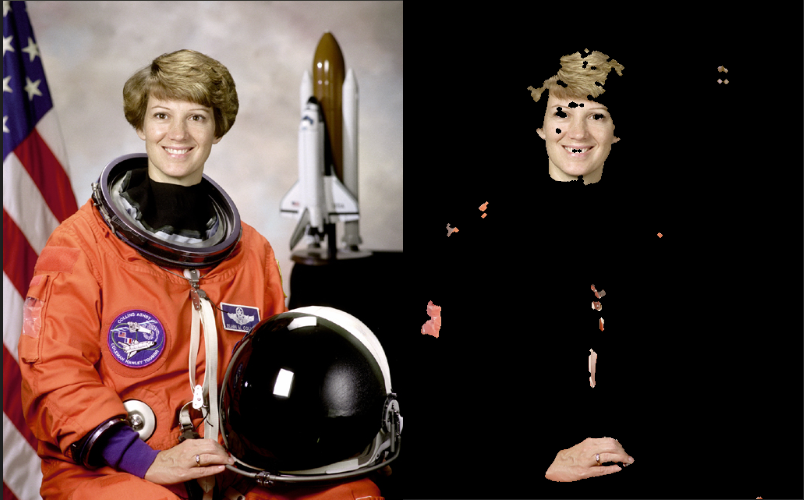
In this code snippet, we’re grabbing an image, detecting skin pixels, and displaying the results. It’s like having a magic lens that highlights only the areas of skin in the picture!
Demonstration
Here’s an example of how the output may look when applied to an astronaut image:
Troubleshooting Tips
If you encounter issues at any step, consider the following suggestions:
- Ensure you have correctly installed OpenCV; refer to the OpenCV installation guide if needed.
- Double-check the image path you provide; it’s crucial that the file exists!
- If all else fails, try removing and reinstalling your dependencies to make sure everything is up to date.
- For more insights, updates, or to collaborate on AI development projects, stay connected with fxis.ai.
References and Further Reading
The foundation of this project can be traced back to notable research papers:
- Skin Segmentation Using Multiple Thresholds (2003)
- Skin color segmentation using multi-color space threshold
At fxis.ai, we believe that such advancements are crucial for the future of AI, as they enable more comprehensive and effective solutions. Our team is continually exploring new methodologies to push the envelope in artificial intelligence, ensuring that our clients benefit from the latest technological innovations.
Conclusion
With this guide, you now have a solid footing on how to implement skin detection using Python and OpenCV. Happy coding!