
Welcome to our tutorial on utilizing the Grounding DINO model for zero-shot object detection. This advanced model creates a bridge between traditional closed-set object detection and the flexibility of open-set recognition, allowing us to identify objects in images without requiring labeled data. Below, we will guide you through the steps to get started and troubleshoot common issues you might encounter.
What is Grounding DINO?
The Grounding DINO model, proposed in the paper Grounding DINO: Marrying DINO with Grounded Pre-Training for Open-Set Object Detection, combines image processing with advanced textual queries, enabling robust object detection even with unseen classes. Its impressive performance boasts a score of 52.5 AP on the COCO zero-shot dataset!
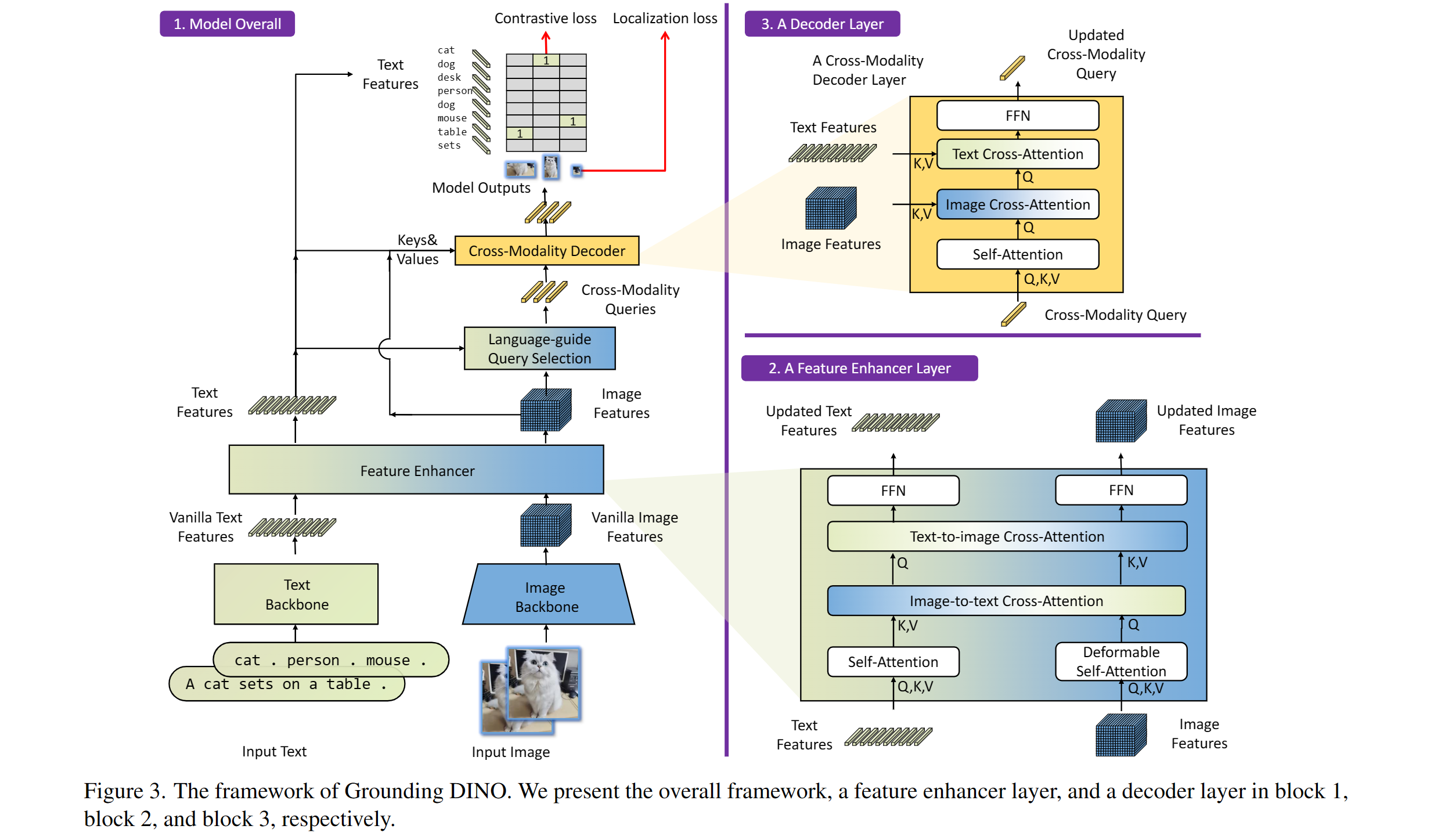 Grounding DINO overview. Taken from the original paper.
Intended Uses & Limitations
- This model is intended for zero-shot object detection, facilitating the task of identifying objects in images without any prior labeled data.
- While this model demonstrates exceptional capability, please be aware of potential limitations in accuracy for classes not represented in your training dataset.
How to Use Grounding DINO
Follow these steps to implement the Grounding DINO model for zero-shot object detection:
import requests
import torch
from PIL import Image
from transformers import AutoProcessor, AutoModelForZeroShotObjectDetection

model_id = "IDEA-Research/grounding-dino-base"
device = "cuda" if torch.cuda.is_available() else "cpu"

processor = AutoProcessor.from_pretrained(model_id)
model = AutoModelForZeroShotObjectDetection.from_pretrained(model_id).to(device)

image_url = "http://images.cocodataset.org/val2017/000000039769.jpg"
image = Image.open(requests.get(image_url, stream=True).raw)

# Check for cats and remote controls
# VERY important: text queries need to be lowercased + end with a dot
text = "a cat. a remote control."
inputs = processor(images=image, text=text, return_tensors="pt").to(device)

with torch.no_grad():
    outputs = model(**inputs)

results = processor.post_process_grounded_object_detection(
    outputs,
    inputs.input_ids,
    box_threshold=0.4,
    text_threshold=0.3,
    target_sizes=[image.size[::-1]]
)
Imagine using a smartphone to recognize objects—you simply point at something and ask, “What is this?” Here, the Grounding DINO model acts as the brain behind your device, decoding the visual data and pairing it with your query. The code snippet above is analogous to your phone’s internal logic: it processes the image, analyzes it, and produces results without prior knowledge of what might be in the picture.
Troubleshooting
If you encounter any issues while using the Grounding DINO model, consider the following troubleshooting tips:
- Device Compatibility: Ensure you have CUDA installed if you’re trying to run the model on a GPU; otherwise, it will default to CPU.
- Package Installation: Confirm that you have the necessary libraries installed, especially
transformersandPIL. You can install them via pip:
pip install transformers PillowFinal Thoughts
At fxis.ai, we believe that such advancements are crucial for the future of AI, as they enable more comprehensive and effective solutions. Our team is continually exploring new methodologies to push the envelope in artificial intelligence, ensuring that our clients benefit from the latest technological innovations.
We hope this guide helps you effectively employ the Grounding DINO model for your projects! Happy coding!