
If you are looking for a way to implement a visually appealing refresh indicator for your Flutter app, then the Liquid Pull To Refresh package is just what you need. Inspired by the stunning designs on Dribbble, this package offers a smooth and elegant refresh experience. Let’s dive into the installation and usage.
Table of Contents
Installing
1. Depend on it
Add the following line to your pubspec.yaml file:
dependencies:
  liquid_pull_to_refresh: ^3.0.1
2. Install it
You can install packages by running the following commands:
with pub:
$ pub get
with Flutter:
$ flutter packages get
3. Import it
To start using the package, import it into your Dart code:
import 'package:liquid_pull_to_refresh/liquid_pull_to_refresh.dart';Usage
To incorporate the Liquid Pull To Refresh, you simply need to wrap a ListView or GridView with the LiquidPullToRefresh widget. Additionally, you will need to specify the onRefresh callback that handles the refresh action.
Note: This widget is meant for vertical scroll views.
LiquidPullToRefresh(
    key: _refreshIndicatorKey,  // Key to access this widget
    onRefresh: _handleRefresh,   // Callback for the refresh action
    child: ListView(),            // The scroll view
);
If you wish to disable the opacity transition of the child, set showChildOpacityTransition to false.
Here’s a quick look at how the widget appears in different configurations:
| Opacity Transition: True | Opacity Transition: False |
|---|---|
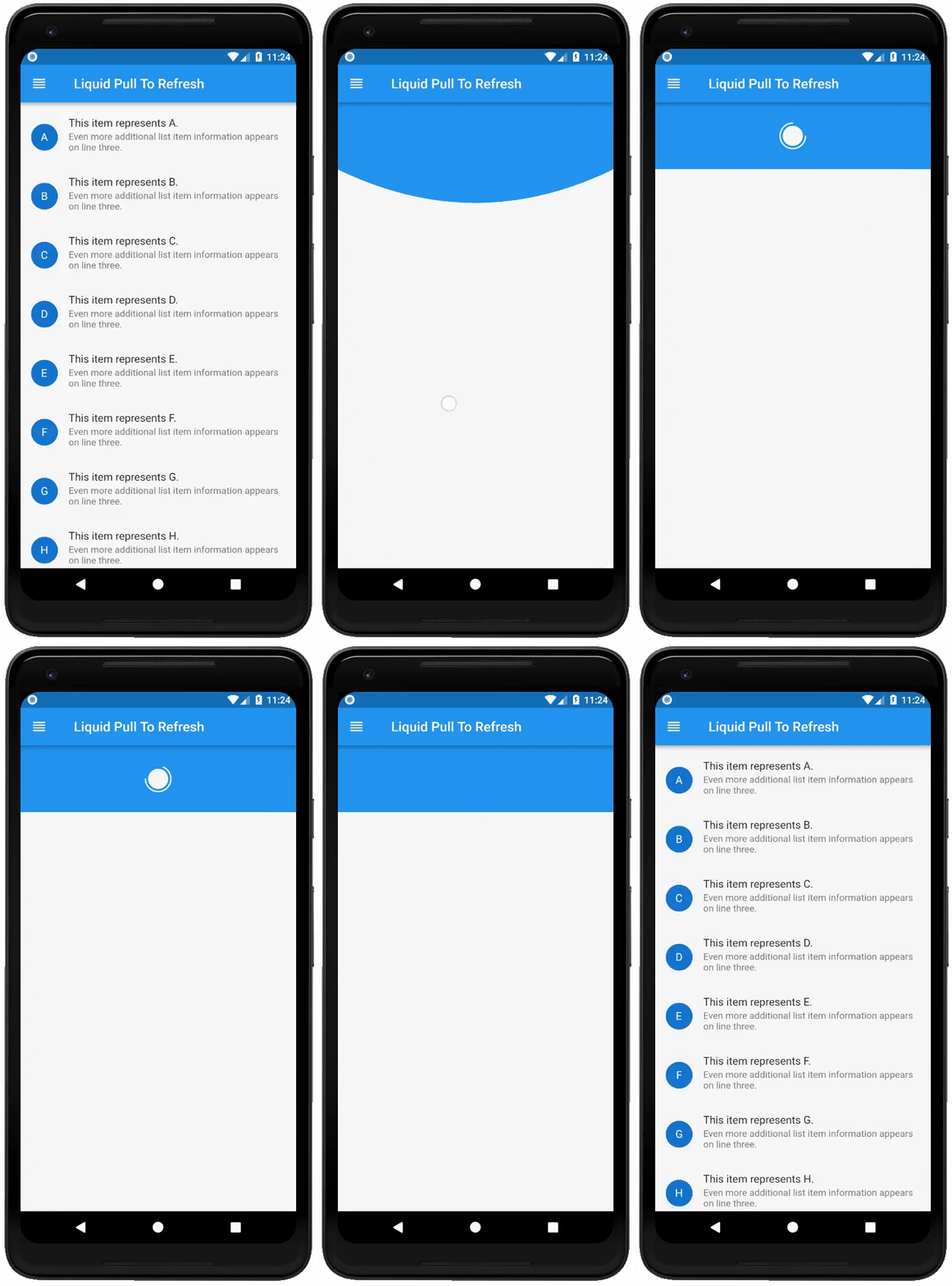 |
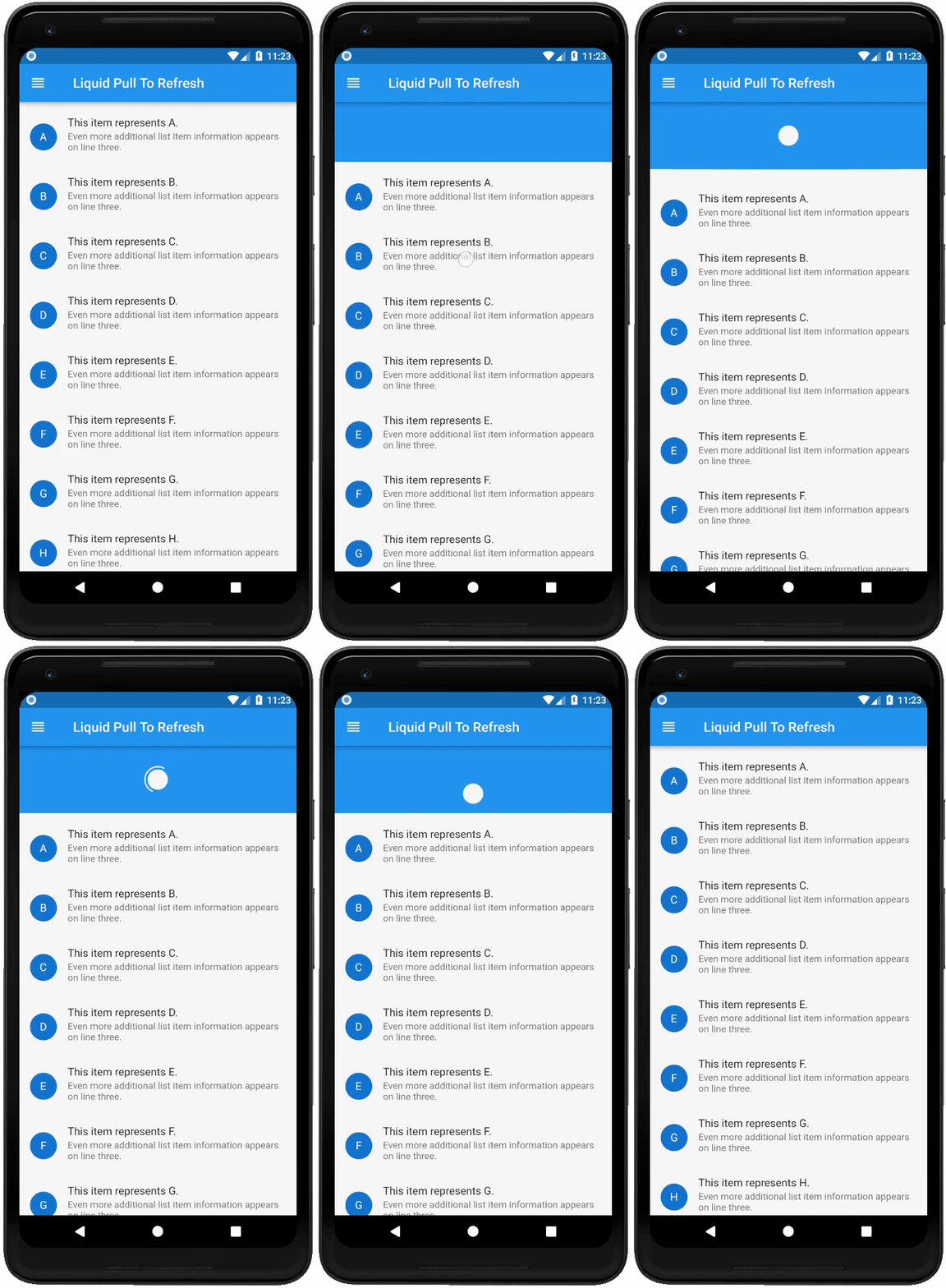 |
Documentation
The LiquidPullToRefresh class contains the following properties:
child: ScrollView,                         // The widget below this widget in the tree.
onRefresh: RefreshCallback,                  // Callback when refresh occurs.
height: double,                              // Distance from the child's edge after drag settles.
springAnimationDurationInMilliseconds: int, // Duration of the animation after dragging.
borderWidth: double,                         // Border width of the indicator.
showChildOpacityTransition: bool,           // If true, show child opacity transition.
color: Color,                                // Color of the progress indicator.
backgroundColor: Color,                      // Background color of the progress indicator.
animSpeedFactor: double                      // Speed of the animation at refresh end.
Bugs or Requests
If you encounter any issues, feel free to open an issue. If you think a feature is missing, raise a ticket on GitHub, and I’ll consider it. Contributions are always welcome!
Donate
If this project has been helpful or you’ve learned something, consider buying me a cup of ☕ on PayPal.
Contributors
Special thanks to all the incredible contributors to this project!
License
The Liquid Pull To Refresh package is licensed under the MIT license. You can view the license here.
Troubleshooting
If you run into any troubles during installation or usage, here are some steps to consider:
- Ensure that your Flutter SDK is up to date.
- Check for any typos in your
pubspec.yamlfile. - Make sure you are running the commands from the project’s root directory.
- If you face issues with the build, try running
flutter cleanand then reconstructing your project.
For more insights, updates, or to collaborate on AI development projects, stay connected with fxis.ai.
At fxis.ai, we believe that such advancements are crucial for the future of AI, as they enable more comprehensive and effective solutions. Our team is continually exploring new methodologies to push the envelope in artificial intelligence, ensuring that our clients benefit from the latest technological innovations.