

Welcome to the comprehensive guide on MLOps! This blog will walk you through the essentials of combining machine learning with software engineering to design, develop, deploy, and iterate on production-grade ML applications. If you’ve ever wanted to transform your ML models into reliable, production-ready systems, you’re in the right place!
Course Overview
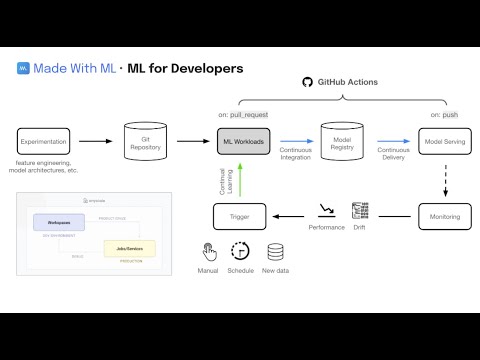
This course takes you from the initial stages of experimentation (model design and development) all the way to production (model deployment and iteration). We emphasize an iterative approach, motivating the essential components needed to build a reliable production system.
Key Features of the Course
- First Principles: Understand every machine learning concept from the ground up before diving into code.
- Best Practices: Adopt software engineering best practices while developing and deploying your machine learning models.
- Scale: Learn how to easily scale ML workloads using Python without needing to learn new languages.
- MLOps: Integrate various MLOps components such as tracking, testing, and serving.
- Dev to Prod: Transition from development to production seamlessly without altering your code structure.
- CICD: Create mature Continuous Integration and Continuous Deployment workflows for ongoing training and deployment of models.
Target Audience
This course suits a wide range of professionals:
- Developers: Both software and infrastructure engineers, as well as data scientists.
- College Graduates: Acquire essential practical skills that bridge academia and industry expectations.
- Product Leadership: Develop a technical foundation to effectively build reliable machine-learning-powered products.
Setup Instructions for the Course
For a detailed walkthrough of the content in this repository, please refer to the course page. Here’s a quick setup guide:
Cluster Setup
Choose between setting up on a local laptop or Anyscale clusters:
- Local: Your personal laptop will serve as the cluster.
- Anyscale: Create an Anyscale Workspace using a user-friendly UI.
Git Setup
Create a new repository:
git clone https://github.com/GokuMohandas/Made-With-ML.git
git remote set-url origin https://github.com/GITHUB_USERNAME/Made-With-ML.git  # -- CHANGE THIS to your username
git checkout -b dev
Using Jupyter Notebooks
Start exploring the Jupyter notebook for an interactive walkthrough of machine learning workloads.
Running the Projects
The codebase has been structured following best practices including:
madewithml config.py
madewithml data.py
madewithml evaluate.py
madewithml models.py
madewithml predict.py
madewithml serve.py
madewithml train.py
madewithml tune.py
madewithml utils.py
Training & Evaluation
Establish your experiment setup with configurations and datasets that can be customized based on your system resources. For training:
export EXPERIMENT_NAME=llm
export DATASET_LOC=https://raw.githubusercontent.com/GokuMohandas/Made-With-ML/main/datasets/dataset.csv
export TRAIN_LOOP_CONFIG=dropout_p: 0.5, lr: 1e-4, lr_factor: 0.8, lr_patience: 3
python madewithml/train.py --experiment-name $EXPERIMENT_NAME --dataset-loc $DATASET_LOC --train-loop-config $TRAIN_LOOP_CONFIG
Continuous Integration & Deployment (CI/CD)
To maintain ongoing improvements, automate the deployment process using GitHub actions.
Troubleshooting
If you encounter issues with Jupyter notebook kernels, manually add the kernel from your virtual environment:
python3 -m ipykernel install --user --name=venvFor more insights, updates, or to collaborate on AI development projects, stay connected with fxis.ai.
Final Insights
At fxis.ai, we believe that such advancements are crucial for the future of AI, as they enable more comprehensive and effective solutions. Our team is continually exploring new methodologies to push the envelope in artificial intelligence, ensuring that our clients benefit from the latest technological innovations.