
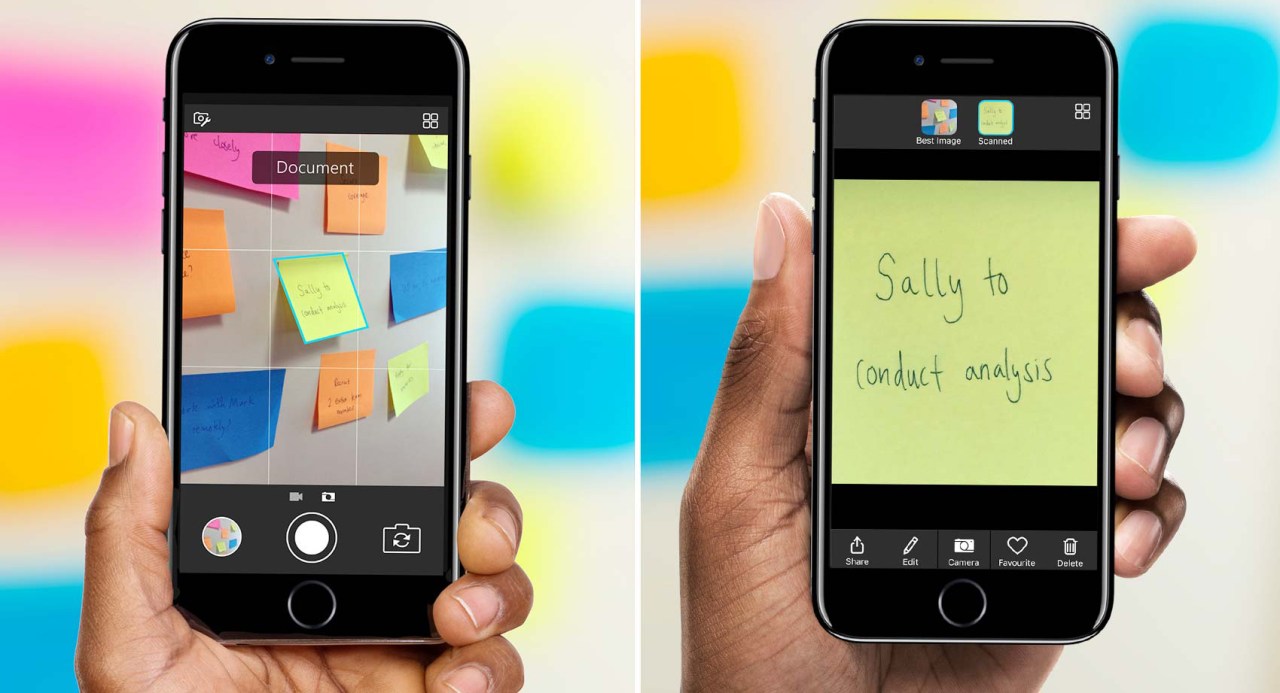
In the age of digitization, every tool that enhances productivity is worth its weight in gold. Microsoft has recognized this necessity and taken a bold step forward by upgrading its AI camera application, Pix. Originally designed to improve snaps for personal use, Pix has now expanded its functionality, paving the way for a new breed of productivity tools. This evolution is not just about enhancing everyday photography; it’s about streamlining business workflows and providing intuitive solutions for professionals everywhere.
Elevating Document Photography with AI
With the latest update, Microsoft Pix is stepping into the business realm, allowing users to effortlessly snap photos of documents, whiteboards, post-it notes, and business cards. By employing advanced AI algorithms, the app analyzes what the lens sees in real-time. This means that whether you’re taking a picture of a hastily written note on a whiteboard or a stack of business cards, the app automatically fine-tunes the camera settings for optimal results.
Imagine this scenario: You’re in a bustling meeting, and the team has jotted down brilliant ideas on the whiteboard. Instead of struggling to capture them at an awkward angle, Pix adjusts the perspective, ensuring the text is clear and legible. This level of assistance not only saves time but also enhances the accuracy of the captured information.
Image Enhancement Redefined
After the photo is taken, Pix doesn’t stop there. Through its AI capabilities, the app goes a step further with a range of image enhancements. It can:
- Crop excess edges for a cleaner shot
- Boost colors and tones for clarity
- Sharpen focus for a more professional look
- Align images for a straight-on perspective
This evolved functionality takes inspiration from another Microsoft favorite, Office Lens, known for allowing users to convert captured images into editable documents. While many existing apps focus solely on document scanning, Microsoft Pix melds traditional photography with this powerful scanning capability to create a more versatile application.
Beyond Basic Scanning
What sets Microsoft Pix apart is that it’s not just a document scanning app; it’s a full-fledged photography tool with added productivity features. In addition to correct image capture, Pix comes with an array of editing effects, enabling users to apply artistic styles to photos taken, making even corporate images a little more fun!
For instance, you can use styles that transform your photos into an artistic format, or create effects that make a whiteboard photo seem like a notebook page. Josh Weisberg, a principal program manager at Microsoft, emphasizes that these styles should cater to both fun and functional photography. The aim is to provide professional-looking results without sacrificing creativity.
What’s Next for Microsoft Pix?
The updated Pix app is already available on the iOS App Store, and as more businesses embrace remote and hybrid working models, tools like this will become indispensable. Companies are increasingly relying on apps that simplify work processes and improve productivity. Furthermore, as technology advances, we can anticipate even smarter features in future updates, making Pix a long-term player in the productivity landscape.
Conclusion
In conclusion, Microsoft’s transition of Pix from a consumer app to a robust productivity tool represents a significant shift in how we use photography in the corporate world. This combination of intelligent scanning and sophisticated editing tools captures the evolving demands of modern professionals, providing a perfect balance between functionality and ease of use. For more insights, updates, or to collaborate on AI development projects, stay connected with fxis.ai. At fxis.ai, we believe that such advancements are crucial for the future of AI, as they enable more comprehensive and effective solutions. Our team is continually exploring new methodologies to push the envelope in artificial intelligence, ensuring that our clients benefit from the latest technological innovations.